

Gojira94
-
Posts
718 -
Joined
-
Last visited
Content Type
Profiles
Forums
Gallery
Everything posted by Gojira94
-
 How did you arrive at the conclusion that fuel is cutting off? You say short term fuel trims look normal- from slightly negative to slightly positive? How much both ways, min/max ST trims? You say that while driving the ST goes to/ stays at zero? Not many things turn off ST fuel trims, but one of those is when PE mode (WOT) is commanded/ detected. If the WOT switch is glitching it may fool the ECU into thinking it's in WOT, zero the ST trims, add an arbitrary amount of extra fuel otherwise suitable for PE mode at whatever RPM/MAP it's at, and bog until you lift out of the throttle. You might want to test the WOT switch to make sure it's not inappropriately entering PE mode. Procedure here: https://www.jeepforum.com/threads/how-to-test-wot-wide-open-throttle-switch.368246/ Edit: test the TPS, too
 -
Yep, mine's in the upper right corner, not really along the top of the blower panel. I'm treating both sides for the rust and sealing from the outside like you did.
-
I have the same leak, passenger side only. Been pondering different ways to get at it, and determine the point of entry. I'm convinced it's coming in between the firewall/ blower panel top edge and the forward cowl panel, from road spray or from a lot of parking nose-down. You've done what I've been thinking already- seal that forward cowl panel's seam from the corner in the left of pic 1. I started prying up along that seam about 1/3 of the way across to get in between the pinch welds and clean, squeeze in a spritz of primer, then seam sealer, and re-compressing the seam flat while the seam sealer dries. Water flowing out of the cowl at the ends/ under the fenders shouldn't settle here unless you're parked nose downhill I don't think. It's definitely coming in the top of the firewall/ blower panel, not the side, in my case.
-
Bottom Radiator Bushings - Dimensions Needed
Gojira94 replied to Salvagedcircuit's topic in MJ Tech: Modification and Repairs
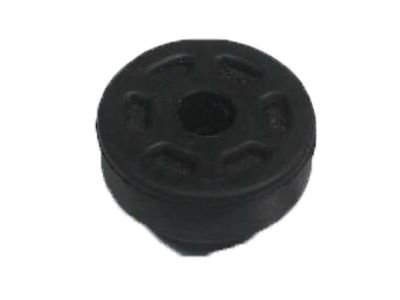
I've followed this thread because I'm also in need of 3 of these. Last week I replaced the compressor and condenser/accumulator in my DD 2003 Accord 2.4/5-spd. Being that my MJ was literally 5 feet away inside the garage I test fitted the grommets from the condenser on the Accord. It was pretty much a perfect fit on the body side, and the inner diameter looked right, though I didn't dig out my radiator and confirm. For $5 each, I'm going to find 3 of these and try it: https://www.hondapartsonline.net/v-2003-honda-accord--ex--2-4l-l4-gas/body-air-conditioning--a-c-condenser (part #6 on the diagram).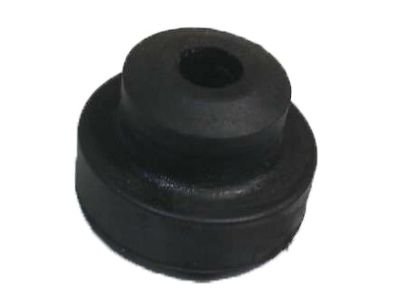
-
The OE part number for all 4.0 applications for MJ and XJ from 87-93 is 4637192. The body of this pump is longer than most of the aftermarket offerings, including the Bosch 69302, Delphi FE0108 and the Walbro 5CA234 noted above. These shorter pumps seem to be turbine pumps, where as the longer ones like OE and the Carter P90011 are likely roller vane (louder, less efficient). The longer ones (about 170mm) are easier to fit but likely have somewhat shorter service life inherent in the design, while the shorter ones (about 135mm) require some cobbling but likely quieter and last longer. IMHO the cobbling required to use the turbine design is worth it, though you need to make sure the end result has the inlet of the pump at the same position as it would be with an older, longer roller vane design for proper fuel draw from the tank. The most important and most often left out spec for a pump is free flow volume in gal/hr or lph. A lot just throw out a pressure spec, but don't say what the regulation method is, or what volume of flow was required to hit that advertised pressure. Pressure is resistance to flow. You can make high pressure with low flow if you restrict the return enough but the delivery rate at low flow won't meet the demand from the rail/ injectors. Too much free flow rate and you have a hard time regulating it to a usable pressure without putting a lot of strain on the pump. From what I've seen looking at a lot of pumps offered for 4.0 applications prior to the change to 49psi at the rail, the required free flow rate to efficiently make 31-39psi is somewhere between 25-45gph (94-170lph).
-
Ohm and cruiser54 are on it- very rich. A weak O2 sensor will do some of it, and as said, exhaust leaks upstream from it will fool it into adding fuel as it will see what appears to be a lean condition. Start with eliminating leaks at the manifold as cruiser54 said, any and all vacuum lines 100% leak-free, cruiser's tips for better sensor grounds, also check throttle body gasket in tandem with the line to the MAP sensor. Check plugs/ gap replace as necessary if fouled, gap at .035." If engine temps aren't getting up where they need to be (any number of mods can make it run cooler than it should) then it'll be stuck rich. Inaccurate coolant temp signal to ECU can also cause ECU to add more fuel than it should (reads colder than actual). High NOx sounds like EGR not working as well as it should. Ignition timing (over advanced) is virtually eliminated with electronic spark control. Gunked up chambers/ valves can add to high NOx. When you're rich and also have high NOx, you have 2 distinct and separate issues.
-
Well done, and thanks for the follow-up.
-
Tuned full-length headers for the $#!&ter upstairs. Must sound really good...
-
Adding a GM rearview mirror wiring question
Gojira94 replied to robfg67's topic in MJ Tech: Modification and Repairs
And 93-02 GM F-Bodies. They have L / R switches for 2 independent lamps in the mirror housing, but no other features as you indicated. -
which t-60 torx for the oil filter adapter upgrade
Gojira94 replied to Pete M's topic in MJ Tech: Modification and Repairs
That's exactly what I heard was the answer. I was prepared for several months for an XJ to pop up in my local yard, only to find on day one each was posted available that someone else had gotten exactly that adapter and nothing else. I'd run out on lunch break the day one posted and it was gone. Like surgical precision. Then I found out a guy 1/2 hr. west of here was harvesting and selling them on EBay for $50.00. I actually bought one from him. He cleans them spotless and includes all needed o-rings for immediate installation. I just couldn't be mad at the guy... -
Renix Distributor Indexing question
Gojira94 replied to Gojira94's topic in MJ Tech: Modification and Repairs
So if the original distributor is long gone this is highly unlikely to be an issue, though still a valid fix in some possible cases where the issue is essentially the same? I'm doing a Renix controlled HO engine from a 93 YJ and am installing a decent quality aftermarket distributor. I'll be interested to see the relative positions of cap contacts and rotor on an unmodified aftermarket dizzy. And tip 13 can always be used to fine tune that relationship. -
Renix Distributor Indexing question
Gojira94 replied to Gojira94's topic in MJ Tech: Modification and Repairs
One other possibility- the engineers who wrote the TSB must have known enough about the timing advance/ retard parameter min/max values to say what the relative positions of rotor tip and cap contact are optimal. The calibration may have been written to default to max retard at any time, unless advance was commanded, i.e. the position shown in Cruiser54's tip 13 may actually be 4*, 8*, 12* or whatever* retarded, and the ECU always commands some amount of advance. Extra advance is needed during cranking, quite a bit at idle and lean cruise, and a lot when the throttle is snapped closed at higher RPMs. Some, but not as much as you might suppose in power enrichment in the higher RPMs. In essence, some degree of advance is commanded at all times, except in the case of knock retard, where it would be able to fall back to whatever retard limit corresponds to the position shown in tip 13. In which case tip 13 is gospel if this possible supposition holds true. -
Renix Distributor Indexing question
Gojira94 replied to Gojira94's topic in MJ Tech: Modification and Repairs
With the cap contact at the trailing edge of the rotor tip set as mechanical 0* there's maybe 16-20* arc of rotor tip available for advance in relation to the cap contact. If we knew from the ECU parameters that max advance was, say 12* and max retard was say, 8* you might want to set the rotor/ cap contact relationship for indexing from #1 with the trailing edge of the rotor visible to the right of the cap contact by maybe 4mm or so. Like instead of this: (advance) |-----------------<+>| (retard) Do this: (advance) |--------------<+>---| (retard) -
Renix Distributor Indexing question
Gojira94 replied to Gojira94's topic in MJ Tech: Modification and Repairs
Correct. You may not have enough rotor tip available/ within close range of the cap contact at a certain point ATDC, or have a pretty large gap to jump is my point here. -
Renix Distributor Indexing question
Gojira94 replied to Gojira94's topic in MJ Tech: Modification and Repairs
This is the crux of my question. In knock retard conditions it could possibly be, without a few degrees of rotor tip spared for the programmed limits for that condition. -
Renix Distributor Indexing question
Gojira94 replied to Gojira94's topic in MJ Tech: Modification and Repairs
GM calibrations in the 727 & 747 ECMs from 87-94 do exactly that, as well as the 16188051 that ran the V8 F-bodies in 94-95. The GM TBI applications on the 727 and 747 had you disconnect the ESC (electronic spark control) module to prevent the ECM from advancing timing at warm idle so you could set the distributor at exactly 0* with a timing light for the ECM to have a valid starting point with room for retard and advance across the arc of the rotor tip. My 94 Formula has the ability to do an immediate 16* of burst knock retard… and bring it back in over about 4 seconds’ recovery time. I think I’m at the point of reaching out to NickInTime and seeing how far he got, taking a crack at dumping the remaining raw hexadecimal data and seeing what can be teased out into the realm of the known. -
Is the point of lining up the trailing edge of the rotor tip to the plug wire contact... to give the ECU plenty of rotor tip to work with, for almost any degree of electronic spark advance, not exceeding the rotor tip's radius/ degrees of arc, tangent to the wire contact in the cap? i.e. if that position in tip 13 represents 0* electronic spark advance, what happens if the ECU commands, say, retard -4* due to knock? If we knew the max advance and retard programmed into the ECU's calibration parameters, could the distributor be indexed even more perfectly, like really close to the end of the rotor tip with maybe 6-8* to spare for retard?

-
Ok, no problem. Open the shell (the Linux command line thing) type lsusb and tell us what that says (there'll be a lot, maybe take a pic or two of the output) type nmtui and let us know if it opens a networking config utility or says something like 'command not found.' Look around in the point-and-click menus and try to find something akin to "settings" with a sub-menu for network stuff. Take a pic if you find it and post it. If anything says "you must be root to do this" in the shell, type su and enter the password for the account root (the built-in Local Administrator account) and repeat the command/ proceed onward.
-
Linux likely sees the wifi dongle but hasn't done anything with it, or has put it in its list of network devices already, and you just have to find it. Run lsusb in a shell (first letter is a lowercase L). This will enumerate all the USB devices attached to the system, by what it sees at the base firmware level. If it's in the list of USB devices, do nmcli dev status in the shell to see if Linux has added it to networking devices. Xfce may have the GUI version of network manager installed by default. From the shell, try nmtui and you may see a rudimentary GUI you can use to enable/ configure the USB wifi. Xfce may also have a settings widget somewhere in its desktop environment that includes configuring network devices, display settings and more, kind of like Gnome and KDE, and many other window managers. For everyday use on the internet, you'll want all devices to have IP addresses assigned by DHCP, DNS server assignment set to auto, or bound to what the DHCP server assigned for DNS. DNS is what resolves website domain names to IP addresses on the internet.
-
Adding supplemental electric fan?
Gojira94 replied to JZLAJeep's topic in MJ Tech: Modification and Repairs
I'm in the same boat, though I'm not on the road yet. My engine harness has a single ground loop at the left fender well but no fan control relay, fan motor or radiator temperature switch (C243, C244, C245) wiring in it or a diode assembly for A/C turn-on of the fan signal. The 88 electrical manual (p.40) says the ground point for the "heavy duty cooling-4L (option)" is at G106. Maybe that's the additional ground loop shown in the harness diagrams with the additional cooling option. I'd swear I read something before that showed the ground point numbers/ locations but I can't find it at the moment to confirm. I picked up a temperature switch (Std Motor Products TS258/ Duralast SW594) to go with a late HO radiator that has the cooling fan switch threaded boss in it. The later electric fans with more blades will have a different connector than the early ones for Renix, but that probably won't matter for building your own setup based on the electrical manual diagram. Just need a 190* temp switch either in the radiator or HO t-stat housing to make the signal, a 40A relay, fan assembly, power & ground. From what I'm reading, there is no signal to/ from ECU in this arrangement for '88. -
I was reading the Renix Fuel Injection Manual yesterday and under injectors (p.57) it says the resistance at 20*C (68*F) resistance should be 16 ohms. That's a bit higher than I would have expected. Is there ANYONE out there who has a couple of these off-car or even still running some that would be willing to ohm a couple out?
-
Engine pics? I love the LTx platform, have tuned a bunch of Opti cars. Congrats on the great find!
-
Alternator move too a/c position
Gojira94 replied to Bezerk1's topic in MJ Tech: Modification and Repairs
I have the no-idler A/C & mech fan bracket + W/P pulley from a 98 XJ, intake & PS setup from a 99 XJ with the (US made) Ebay relo kit, using an HO alternator: My belt size came to 74". My only concern with this setup is how well the belt will engage the mech fan pulley. An A/C compressor, with its much larger diameter pulley probably gives an additional 20* of engagement against the mech fan pulley than the smaller alternator pulley. I'll find out if that's an issue when I finally get my rig running. The HO alternator does require installing an external regulator, not too difficult. The guy who makes the REM has a video on the job using an 89 XJ to demonstrate: -
Windows: C:\Users\<your_username>\Pictures Linux: /home/<your_username>/ (depending on Linux distro, may have a 'pictures' dir, you may have to make one) Linux built in wallpapers is usually /usr/share/wallpapers. 'usr' is Unix System Root, and though it makes your brain think "user" that's not the case. Things in the /usr folder are usually restricted to being modified by the user 'root' or another user or group of local users that can act as root with sudo, or by giving them write permissions to the folder on that directory (not advisable). A normal user has full permissions to make whatever files and directories it wants in its own home dir ( /home/<your_username> ) If you want to know the path of where you are at any time, type pwd in the shell. / is the equivalent to C:\ (the topmost directory on the filesystem containing the OS). /usr would be like C:\Windows. To make a new directory, just like in Windows you'll use mkdir, i.e. mkdir /home/<your_username>/pictures or if you're already in /home/<your_username> (the default when you open a shell as a normal user) you can just do mkdir pictures. Avoid the temptation to use a leading capital letter for files and directories. Linux is case-sensitive and Pictures is not the same as pictures. Windows is not case-sensitive so you can't have both on the same path. And having to type that leading capital letter become tedious quickly.
-
I've been AFK since Friday, just seeing the updates now. Very happy you got into it and got the disk sorted out. I was always fond of KDE (KDesktopEnvironment) but getting it installed on most major distros that have left it out of their source repos these days make it more trouble than it's worth. I'm not fond of Gnome but I got used to it on my RHEL laptop. For older systems, finding the distro that works well on the hardware with minimal overhead, with decent performance, with a desktop system you can tolerate is the formula for ultimate success. Sometimes it takes a while to find the one you like. Changing wallpapers in graphical mode can be done by downloading or copying in wallpaper images you like and switching to them in the settings.