
NickyV
-
Posts
159 -
Joined
-
Last visited
Content Type
Profiles
Forums
Gallery
Everything posted by NickyV
-
Diagnosing Clutch Issues: Help/Advice Wanted
NickyV replied to NickyV's topic in MJ Tech: Modification and Repairs
SOLUTION: I want to close the loop on this thread in case anyone finds it in the future. This is what I think fixed my issue: My truck has the internal slave cylinder, which has a bleeder valve. There were at least two possible culprits: 1) Originally I thought I had a pinhole leak in the rubber section of my clutch hose. I used some rubber patching material, tape and some hose clamps to cover that up. I’m still not sure if there was actually a leak here. 2) Now I think the real issue was with my bleeder valve. Inside the nipple of the bleeder valve there is a gasket that was slightly askew. I fixed the position of that gasket and I added a little bit of teflon pipe tape around the threads of the nipple cap. Clutch has been very solid ever since. And I haven’t noticed any leaks on the master cylinder. I don’t know why or if the drippy master was somehow connected. Maybe something to do with low pressure in the line or air getting into the line. But I’m pretty sure the bleeder nipple was the main issue. -
Anyone running wheel spacers on 235 75R 15s with no lift? If so, can you share pics? I’m not sure I want to lift my MJ. But if I do, it won’t be for a while. Too many other projects to tackle first. But I am considering wheel spacers. Not looking for anything crazy. I mainly want to fix that narrow butt look and gain a more aggressive stance that extends just a hair wider than fender flares. At least I think that’s what I want. But I am having trouble visualizing this. So if any of you have an MJ that fits the bill and could share pics, I’d be much obliged.
-
What CC knows about stock Jeep radios
NickyV replied to NickyV's topic in MJ Tech: DIY Projects and Write-Ups
Hey @A-man930 - Attaching a picture. Sorry, It's not the greatest. I might have undersold it when I said "simple A/B switch." Last year when I did this project, I had an RCA switch that I was no longer using. It was actually a five-way stereo switch that I previously used for my home stereo system. The switch has a rotary dial. I mounted it facing down, underneath the steering wheel on the bottom most panel. To use it, I reach under the wheel (below where that vent is between the driver's legs) and turn the knob to select between the two inputs. The other three stereo inputs are not used. On the left hand side are the RCA inputs from the radio and the Bluetooth receiver. On the right are the RCA outputs that run down along the driver side door and back to the amplifiers. I am planning to change this setup soon (maybe this weekend). It works fine, but it's a bit over-engineered. My plan is to install a simpler A/B switch and an inline volume knob. I think I will mount it in the space under the clock. Pics below. If you don't have the computer display that monitors engine performance (and I think most of us don't have that), there should be plenty of space underneath the clock to cleanly mount both of these components. Just in case you need more info on how to make this work, here are some other components you need: - Line Level Converter: You need one of these to turn the stock radio outputs into RCA (line level) outputs. - Various RCA cables of appropriate length - Bluetooth Receiver. Here are the components I plan to install to simplify my setup a bit. I'm going to install the inline volume knob so I can control volume from the dash, rather than using my phone's volume buttons.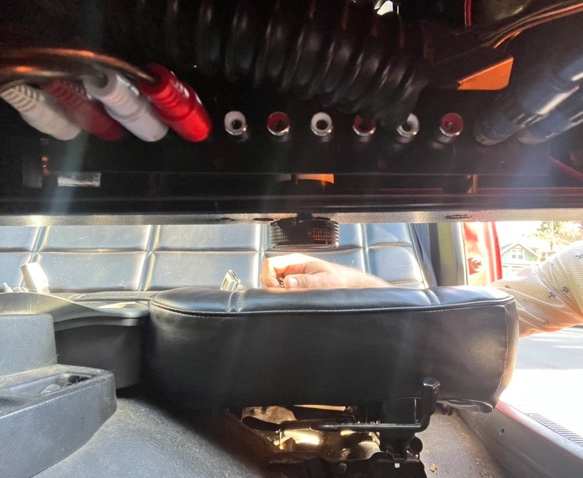
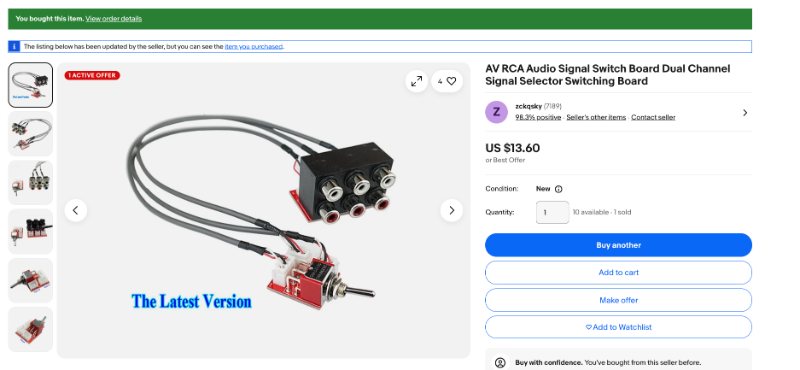
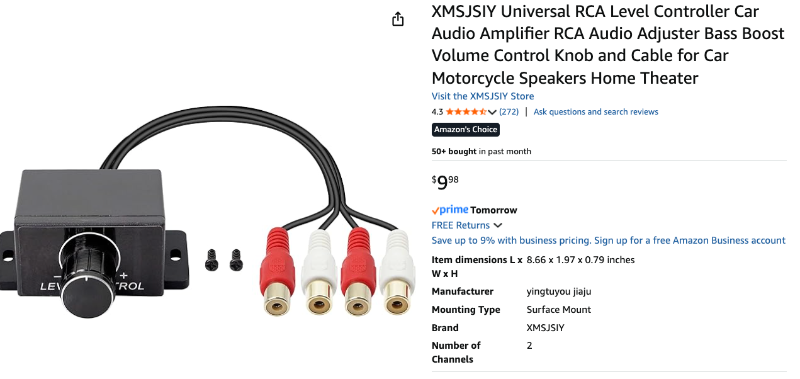
-
I also want to endorse this method! I had been getting prepared to do the full rebuild and then thought, why not try this first? It is working great! I’m a few weeks in now and I can park on steep hills again! I made a video for anyone else who wants to give this a try before completely rebuilding their brake assembly: https://www.tiktok.com/t/ZTMkB6s4A/
-
What CC knows about stock Jeep radios
NickyV replied to NickyV's topic in MJ Tech: DIY Projects and Write-Ups
I’m following up on my last post from almost a year ago. I tried to mod the AR series radio I have. My goal was to make it so ny Bluetooth receiver would go through the radio’s internal volume and dynamics controls. It did not work. I’m not sure which AR I have, but it resembles the AR-7750. I tried tapping into the two wires that Minuit identified on the treble slider. It did not work as I hoped and had to re-solder those two connections back together :-/ I set up a simple A/B switch to toggle between Bluetooth and radio and that has been working fine -
Ah... It's cool that I have an AMC, but also this. Too bad. I had been wondering why some of the trucks in the registry had so much more info. Thanks for explaining!
-
I just went to the listed manufacturer's website. I'm thinking about giving them a call. It seems like they have only ever really made RVs. Is it possible that they could have taken a contract to build Jeeps to be sold elsewhere? Or maybe I A two questions and an observation: 1) Does someone have a key for what all the abbreviations mean? I've been Googling around to no avail. 2) Does GEC refer to the rear window? My current rear window is a solid pane. 3) If this thing had tinted windows at some point, it definitely doesn't anymore. Although, sometimes when I look closely, it does seem like maybe they were a bit smokier in the past.
-
Wow! Very cool! I'll have to read up a bit more on how to read this table. Some of this stuff is Greek to me. But I will say that I still have a bench seat, and my MJ did come with a compact spare tire, that I still have (although there is a full size one tucked up under the bed now). One more thing I will say: My MJ may have come all the way from Alabama, but it has been in California for quite a while. When I bought the truck, it came with a blue license plate with yellow numbers/letters. A quick Google search indicates that the state stopped issuing those with any regularity around 1986 or '87.
-
EGR Valve Questions: 1987 2.5L Renix
NickyV replied to NickyV's topic in MJ Tech: Modification and Repairs
Found it! Posted it! I had definitely been meaning to do that. So do I eventually get a report from @jdog? Hope so. Can't wait! -
Year: 1987 Make/Model/Bed: Comanche/Base/Short Bed Engine: 2.5L Transmission: AX4 (It's definitely a four-speed manual!) Transfer Case: It is 2WD, so no transfer case, right? Front Axle/Rear Axle/Wheelbase: I don't know about the axles, but I think they are from factory. Wheelbase is 113 inches, I believe. Build Date: Sticker on the door is not clear. Current Location: Bay Area, California Status: Roadworthy. Not a daily driver, but I drive it regularly around town and take it on camping trips.
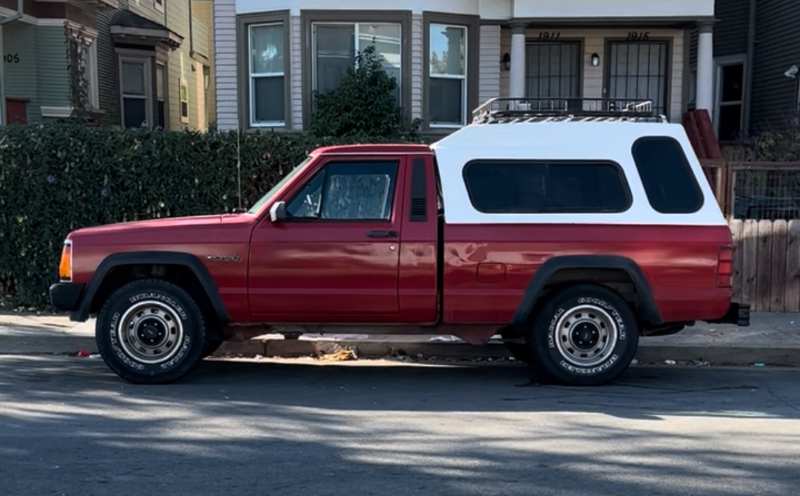
-
EGR Valve Questions: 1987 2.5L Renix
NickyV replied to NickyV's topic in MJ Tech: Modification and Repairs
Thanks! I honestly don't remember if I've posted my VIN on CC. But I'm thinking that I haven't. Where should I do that? -
EGR Valve Questions: 1987 2.5L Renix
NickyV replied to NickyV's topic in MJ Tech: Modification and Repairs
To your question about when my MJ was built: I'm not sure. I don't know if I have ever taken a deep dive into that. I just checked my VIN on Jeepz.com and all it said was that it was a 1987 model year. What I can tell you is that there is definitely a T valve right next to the EGR solenoid. One end of the T valve traces to the hookups near the TBI. The other end is on a thicker vacuum line that goes to a plastic bottle under the passenger side headlight. The third end goes into the solenoid itself. By the way, I've never had a terribly rough idle. It could be better. But it's good, all things considered. Also, I haven't ever encountered much to suggest PO tomfoolery (at least not under the hood... inside the cab... that's a different story). Then again, I'm still very much a novice under the hood, so who knows? -
EGR Valve Questions: 1987 2.5L Renix
NickyV replied to NickyV's topic in MJ Tech: Modification and Repairs
Hey hey, @eaglescout526! I can always count on a quick response from you. I was thinking about making a new thread about this, but since you just replied to me, I'll post this here for now: The emissions diagram sticker on the driver's side firewall of my truck matches what I've found online for the 1987 2.5L. But it seems like the EGR may actually be routed like a 1986. On the 1986 diagram, there is a T valve right before the inlet of the EGR solenoid. On the 1987 diagram, it appears that there is not a T valve. The orange rectangle is the diagram I have under my hood. The red circle shows the T valve that my truck seems to have. Maybe I'm reading my diagram wrong and it shows a T valve. But if not, I'm wondering if that could be a problem? Could it indicate other issues? Or is this just a common peculiarity?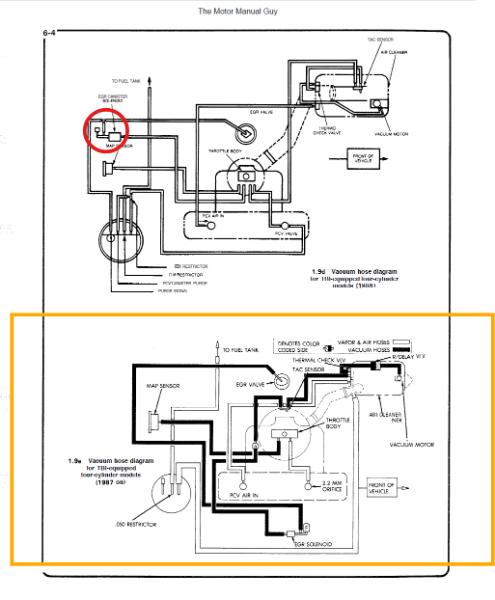
-
EGR Valve Questions: 1987 2.5L Renix
NickyV replied to NickyV's topic in MJ Tech: Modification and Repairs
Got some updates on this project. I am planning to do a video or more comprehensive write-up on this once all is said and done. But for now, I am now quite certain that @eaglescout526 is correct about the EGR Valves in 2.5L Renix MJs. Thanks! The EGR valves for this model have a "bleed" feature and they cannot be tested using the traditional hand-pump vacuum test. Due to some science that I understand in the abstract but can't really explain using words, the truck needs to be warm and under load (not in neutral) for the EGR valve to actually open up. I guess it uses a combination of vacuum suction from the EGR nipple and pressure coming directly from the engine. Anyway... I'm going to put it in bold, in case anyone comes across this later: The vacuum pump test that works on many older EGR valves DOES NOT work for the 2.5L 1987 MJ. Testing your EGR valve this way will not help you diagnose it. What you can do, is get a pen or pencil or something like that, and push up on the diaphragm from the underside of the EGR while the engine is running. That will at least give you the sputtering idle test. And it will tell you that, at the very least, your EGR valve is doing what it is supposed to when it is shut. I hope to eventually make a video about all of this. But now I've got another conundrum! The vacuum diagram under the hood of my truck does not match the actual vacuum routing under the hood. So far, I've only discovered this discrepancy for the vacuum hoses routed to my EGR, but I'm wondering if there are other peculiarities. I'm going to do a little digging on the forum to see if anyone else has encountered this, and I may start another thread. -
EGR Valve Questions: 1987 2.5L Renix
NickyV replied to NickyV's topic in MJ Tech: Modification and Repairs
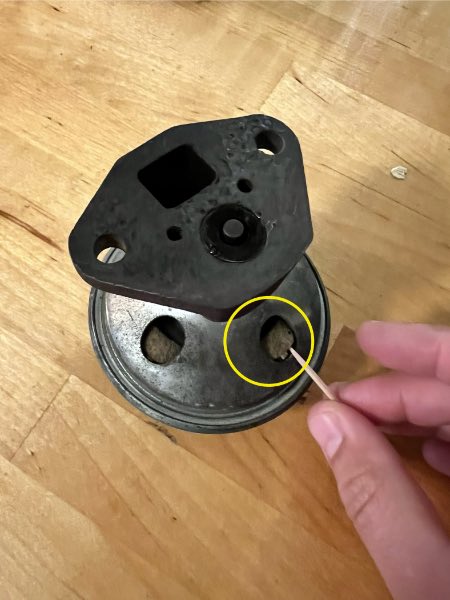
This is my old EGR valve. In the bottom view I can see what appears to be a gasket that has shrunk. That’s what I’m pointing to with the toothpick. In the top view there is the vacuum port. It’s wrapped in a little white electrical tape, which I used to make a seal for my vacuum pump when I was trying to test it. You are saying I should not be able to pass any air through that tip when blowing into it? I do think there are some models of older EGR that will hold vacuum if you attach a vacuum pump to them, even if they are cold. But I am now convinced that my MJ uses a back pressure EGR valve. And I don’t think they hold vacuum unless the engine is running and under load. Watched a ton of YouTubes today. Lol. At any rate, I appreciate the insights, as always!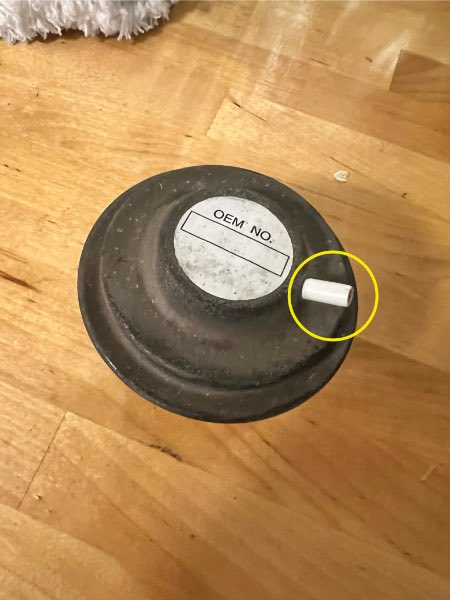
-
EDIT: I've done a bunch of tests and am more familiar with this system now. A few updates here. I only failed smog on one portion of the test -- NO (PPM) at 25 MPH. When on the dynamometer at 15 MPH, the truck was well within the permitted NO (PPM) numbers. It failed at 25 MPH when the NO (PPM) spiked significantly. From my reading, this could be due to the cat starting to fail (ugh...) or perhaps the EGR wasn't working properly. --- --- --- My MJ failed smog so now I'm troubleshooting. This is all new to me and I wish I'd taken a video when the smog tech was giving me advice, but here's what I remember of what he said: 1) Something about not seeing any pressure when connecting his vacuum tool to my EGR valve. 2) Something about too much NOx? 3) Suggesting I replace my EGR valve, my O2 sensor and replace my tailpipe which is full of holes (not sure where... I haven't identified all of them). I have since replaced the EGR valve, with a Standard Motor Products EGV580 from Rock Auto. But before moving onto the O2 sensor and the exhaust, I wanted to make sure I did it right, so I tried to reverse engineer what he did and now I'm just getting confused and wondering if I picked up a bad EGR or if I'm just not doing these tests right. I've tried various tests by hooking up my own vacuum pump to various connections under the hood and I've noticed a few things: 1) With the engine off, I hook up the vacuum pump directly to the newly installed EGR vacuum port. It does not hold pressure. 2) With the engine running and warm, I hook up the vacuum pump directly to the newly installed EGR vacuum port and I do not see it creating any pressure. 3) With the engine running and warm, I hook up the vacuum pump to the vacuum line that normally connects to the EGR vacuum port. I rev the engine and the needle on the gauge reacts, but only for a split second. I don't know enough about this to understand if this is a normal behavior or not. I've been Googling around and getting more confused. At first I thought that the EGR valve should hold vacuum right out of the box. (Unfortunately, I did not test it out of the box and am only testing now that it is installed). But then I'm coming across information that with back pressure EGR valves, it will NOT hold vacuum out of the box, and maybe this is a back pressure EGR valve? Any and all advice is appreciated. Thanks.
-
Advice Needed: Internal-External Slave Cyl Swap on AX-4
NickyV replied to NickyV's topic in MJ Tech: Modification and Repairs
Update: Since working on the clutch back in May, I haven't lost pressure. Been driving it longer distances too. Not sure if that pinhole was really a pinhole, but maybe. My theory is that the real culprit was actually the bleeder valve itself. I found some old paperwork on the truck from back when I wasn't as handy with this stuff. A mechanic replaced the internal slave in like 2020 or thereabouts. In the notes, he wrote that he had to try a few after market slave cylinders that failed before buying an OEM one. He also mentioned that there was an issue with the tiny internal gasket inside the bleeder. When I did my more thorough fix, I paid close attention to the bleeder and actually wrapped a little bit of teflon tape around the threads of the bleeder because I thought it was weeping a bit. Starting to think that might have gone a long way. I will eventually replace the line between the master and the slave cylinder, but I'm feeling a lot better about the clutch. Now I gotta figure out why the brand new thermostat I put in there in April is acting up. I'm starting to think that the real lesson here is to not buy cheap parts. Who woulda thunk it? -
Advice Needed: Internal-External Slave Cyl Swap on AX-4
NickyV replied to NickyV's topic in MJ Tech: Modification and Repairs
Hey @eaglescout526 and everyone else. I got busy with life the past couple weeks. I just sat down to do some more research. Everything I'm finding on EBay when it comes to bell housings says AX5 or AX15. But I have the four-speed. Does that matter? And another question, I've learned a lot over the years, but I'm getting lost in a lot of the technical talk here. I feel confident I have the tools and capability to do this, but I'm just getting overwhelmed by figuring out what parts I should even get in the first place. As for @ghetdjc320's point about an internal slave working well if it is a quality build... that has me thinking. If I have to drop the transmission anyway and I'm getting overwhelmed by trying to figure out this bell housing and additional equipment stuff, maybe I should just replace the internal slave. If I went that route, do you all have recommendations for the parts I should buy. A few more observations and questions: When the clutch went out most recently, I had to park the truck overnight on the side of the road and come back out and fix it there. It was not ideal. I found what appeared to be a pinhole in the hose that connects the metal portion of the clutch line (up in the engine bay) to the transmission. I put tape over it and wrapped a couple small hose clamps around it. I drove it about 20 more miles and it was starting to fail by the time I got home. Once I was home, I worked on it some more. I took my time re-wrapping the location where I found the pinhole using some pipe tape and I re-tightened the hose clamps. It's been a few weeks now, and I haven't driven it very far, but every time I've gotten in the truck since then the clutch has seemed pretty good. All of this to say I'm not 100% that the slave is actually leaking. It might have been that pinhole that I think I found. Maybe I should start by replacing that length of hose and the master cylinder first. I'm not entirely sure what kind of hose I should get though. All the creature comfort work I've done on this truck has come pretty easy to me, but the mechanics under the hood is harder. Sorry... I'm just kinda thinking out loud right now. And I know I'm going to be busy this weekend and next so I don't really have the ability to work on this thing yet. I know I can figure this out. But any more help would be appreciated. And explaining it like I'm 5 would also be helpful. Thanks. -
Advice Needed: Internal-External Slave Cyl Swap on AX-4
NickyV replied to NickyV's topic in MJ Tech: Modification and Repairs
OK. I just read it real quick. I need to take a closer look. Wonder if @eaglescout526wants to chime in. Based on my initial understanding of this method, I’m a bit concerned that I would have to first FIND the parts or locate an XJ that old and pull the required components. Then they would have to work. And if they broke, I’d have to do it all over again. The point of doing this swap is so I can do a bunch of work all at once and then make my life easier down the road. Not sure I want to set myself up for finding 40 year old components every time my clutch starts acting up. Oh the joys of MJ ownership! -
Advice Needed: Internal-External Slave Cyl Swap on AX-4
NickyV replied to NickyV's topic in MJ Tech: Modification and Repairs
Hey @89 MJ and @ghetdjc320 — So if I am reading you both right, you are saying that there is a way to do this without swapping the bell housing, input shaft retainer and all that? But in order to do that, I need to find a working external slave cylinder on an 84-86 XJ? Sorry… I’m doing this out of order. I will read the post from @eaglescout526 and hopefully that will make it clear. -
Well… I was collecting the parts and psyching myself up to finally tackle installing AC in my MJ. And then the clutch went out. Again. So now the clutch is my priority. I have been limping along by bleeding it regularly (not fun, but I guess I’m getting better at it). Can someone give me a shopping list for making the internal-external slave swap? I have a 1987 2.5L AX-4. I’ve seen some posts that say I just need a different bell housing plus a few more parts. So what do I need? One more question. I’ve had the clutch fixed a few times by mechanics. This was before I really started researching how to do this myself. I know the most recent time it was done that only the master was changed out. If the clutch keeps going out, and even if it is leaking at the master (it is) should I assume the slave is going out as well? Maybe you can tell, but I’m just wondering if there is any way I DON’T have to drop the transmission. Sigh. I know what the answer is going to be already. No way to know. I should probably replace all of it to be sure.
-
SOLVED: Chime Module not chiming
NickyV replied to NickyV's topic in MJ Tech: Modification and Repairs
Thanks @Ωhm! You helped me to start looking in the right place, and I realized that my issue was between the chime module input and the driver's side door jamb switch (which the manual calls "LH door jamb switch"). Plugging in the seatbelt switch got rid of the "OL" multimeter reading on Port 4. Then I started troubleshooting Port 6. I think this is where the bigger issue was. For those who are experiencing the same issue (chime module passes bench test but doesn't work when plugged in) I'd recommend checking your driver's side door jamb switch as a very early step in the troubleshooting process. There are two ground connections on the driver's side door jamb switch. I now realize that one of these grounds serves the circuit for the courtesy lights and the other ground serves the chime module circuit. Based on my experience, you need the second ground for the lights-on warning and the key-in warning. It seems like the seatbelt warning is independent, and plugging or unplugging the connection under the seat only impacts the seatbelt warning. A mistake in logic that I made during this process was reasoning that my door jamb switch was fine and not looking at it sooner. I thought it was fine because my courtesy lights were working as expected. But, as I said, there are two grounds going to the driver's side switch. After all was said and done, I ended up unplugging my seatbelt warning connection again and leaving it that way. After driving around for a bit, I discovered that there is some kind of loose connection in the buckle itself, because the seatbelt sound/light would come on periodically and I'd have to jiggle my seatbelt to make it stop. These modules really do make an awful sound. Haha! I hope it serves to ensure I never leave my lights on or lock my keys in the Jeep again. -
SOLVED: Chime Module not chiming
NickyV replied to NickyV's topic in MJ Tech: Modification and Repairs
Before I pull the bench seat and fish out C199, I want to mention that I have done the Headlight Harness Upgrade. I also recently replaced my headlight switch. Looking back at my old post, when I did that, I installed a headlamp switch that had the extra prong, which is related to the parking lamps... something about turning them off when the headlights are on? I don't know if this input actually does anything on an MJ, but I also don't think I have ever looked to see. -
SOLVED: Chime Module not chiming
NickyV replied to NickyV's topic in MJ Tech: Modification and Repairs
Oh. OK. I get it. Bridge the A and B through a fused jumper. Got it. -
SOLVED: Chime Module not chiming
NickyV replied to NickyV's topic in MJ Tech: Modification and Repairs
OK. Thanks for that suggestion. I should jump it to a ground, yes?